Achieving the right balance between print speed and quality is a challenge faced by many users of additive manufacturing technology. Whether you’re producing prototypes, functional parts, or artistic models, the way you configure your machine’s speed settings can have a significant impact on both the final outcome and the time required. 3D printer speed optimization is about finding the sweet spot where efficiency and quality meet, ensuring your projects are completed faster without sacrificing detail or reliability.
In this guide, we’ll explore practical strategies for adjusting speed settings, understanding the trade-offs involved, and applying proven techniques for better results. If you’re interested in mastering more advanced techniques, you may also want to read about printing complex geometries to further expand your 3D printing skills.
Understanding the Role of Speed in 3D Printing
The speed at which a 3D printer operates directly influences both the appearance and structural integrity of the printed object. Faster print speeds can reduce production time, but may introduce issues such as layer misalignment, poor surface finish, or even failed prints. On the other hand, slower speeds often yield higher-quality results but at the cost of longer print durations.
Optimizing print speed involves more than simply adjusting a single setting. It requires a holistic approach that considers the printer’s hardware, the material in use, the complexity of the model, and the desired outcome. By understanding how these factors interact, you can make informed decisions that enhance both efficiency and quality.
Key Factors Affecting 3D Printer Speed Optimization
Several variables play a role in determining the optimal speed for your 3D printing projects. Let’s look at the most important ones:
- Printer Hardware: The rigidity of the frame, the quality of the stepper motors, and the type of extruder all influence how fast your printer can reliably operate.
- Material Properties: Different filaments (PLA, ABS, PETG, resin, etc.) have unique flow characteristics and cooling requirements, affecting how quickly they can be printed without defects.
- Layer Height and Nozzle Size: Thicker layers and larger nozzles allow for faster printing, but may reduce the level of detail. Finer layers and smaller nozzles increase detail but slow down the process.
- Model Complexity: Intricate designs with overhangs, bridges, or fine details often require slower speeds to maintain accuracy and prevent errors.
- Cooling and Adhesion: Proper cooling is essential for fast prints, especially with materials prone to warping. Bed adhesion must also be considered when increasing speed.

Practical Techniques for Faster and Better Prints
To achieve effective 3D printer speed optimization, it’s important to combine hardware adjustments with software tuning. Here are some actionable steps to help you get started:
1. Adjust Print Speed Settings in Your Slicer
Most slicing software allows you to set different speeds for various parts of the print, such as perimeters, infill, and supports. Start by increasing infill speed, as it is less visible, while keeping perimeter speeds moderate for better surface quality. Gradually raise speeds in small increments and observe the results.
2. Optimize Acceleration and Jerk Values
Acceleration and jerk settings control how quickly your printer changes direction. Higher values can reduce print times but may cause ringing or ghosting on the surface. Test different values to find a balance that maintains quality while improving efficiency.
3. Use Larger Nozzles and Thicker Layers
Switching to a larger nozzle (e.g., from 0.4mm to 0.6mm or 0.8mm) allows you to print thicker layers and finish jobs faster. This approach is ideal for prototypes or parts where fine detail is less critical.
4. Enhance Cooling and Material Flow
Strong part cooling fans and optimal extrusion temperatures help maintain print quality at higher speeds. Ensure your printer’s cooling system is functioning properly and adjust temperature settings as needed for your chosen material.
5. Maintain Your Printer Regularly
Clean and lubricate moving parts, check for loose belts or screws, and calibrate your printer regularly. Well-maintained machines can handle faster speeds with fewer issues.
Balancing Speed and Print Quality
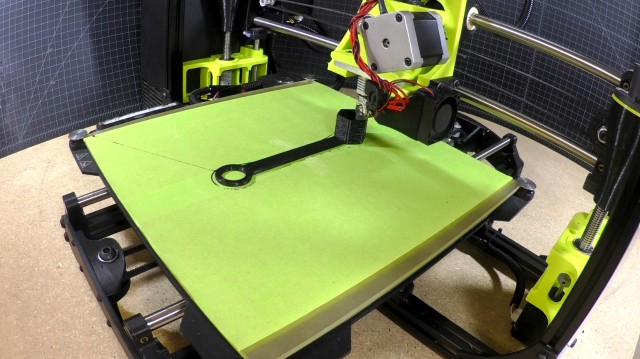
While the desire to finish prints quickly is understandable, it’s important to recognize the trade-offs involved. Excessive speed can lead to visible defects such as stringing, blobs, or weak layer adhesion. For critical parts or those with intricate features, prioritize quality by reducing speed and using finer settings.
For less demanding applications, such as draft models or large, simple shapes, increasing speed can save significant time. Always test new settings on small calibration objects before committing to large prints.
Advanced Tips for Efficient 3D Printing
Once you’ve mastered the basics, consider these advanced strategies for further improvements:
- Upgrade Firmware: Modern firmware like Marlin or Klipper offers advanced motion control features that can boost speed without sacrificing quality.
- Use Adaptive Layer Heights: Some slicers allow for variable layer heights, printing thicker layers where possible and finer layers where detail is needed.
- Leverage Multi-Material Printing: For complex projects, using multiple materials or colors can be streamlined with optimized toolpaths and print speeds.
- Explore Professional Software: Platforms such as Autodesk’s 3D printing solutions provide advanced slicing and simulation tools to help you fine-tune speed and quality for industrial applications.
- Design for Speed: Simplifying models and minimizing unnecessary details can lead to faster prints. For more on this, see our guide on how to design for 3D printing.
Common Mistakes to Avoid When Increasing Print Speed
As you work towards faster prints, be mindful of these frequent pitfalls:
- Ignoring printer limitations and pushing speeds beyond what the hardware can handle.
- Overlooking the importance of cooling, especially with materials like PLA or PETG.
- Failing to test new settings on small objects before large-scale production.
- Neglecting regular maintenance, which can lead to mechanical failures at higher speeds.
- Using generic profiles without customizing for your specific printer and material.
FAQ
What is the best speed for 3D printing?
The ideal speed depends on your printer, material, and model complexity. For most desktop FDM printers, a range of 40–60 mm/s for perimeters and 60–100 mm/s for infill is common. Always start conservatively and adjust based on print results.
How can I increase print speed without losing quality?
Focus on optimizing infill and non-visible areas, use larger nozzles, enhance cooling, and fine-tune acceleration settings. Regular maintenance and high-quality materials also help maintain quality at higher speeds.
Does nozzle size affect print speed?
Yes, larger nozzles allow for thicker layers and faster prints, but may reduce detail. Choose nozzle size based on the level of detail required for your project.
Are there software tools to help with speed optimization?
Many slicers offer built-in speed tuning, and advanced software like Autodesk’s 3D printing solutions provide simulation and optimization features for professional users.
By applying these 3D printer speed optimization strategies, you can streamline your workflow, reduce production times, and achieve consistent, high-quality results. For further reading, explore our articles on 3D printing file formats explained and 3D modeling tips for printing to enhance every stage of your additive manufacturing journey.